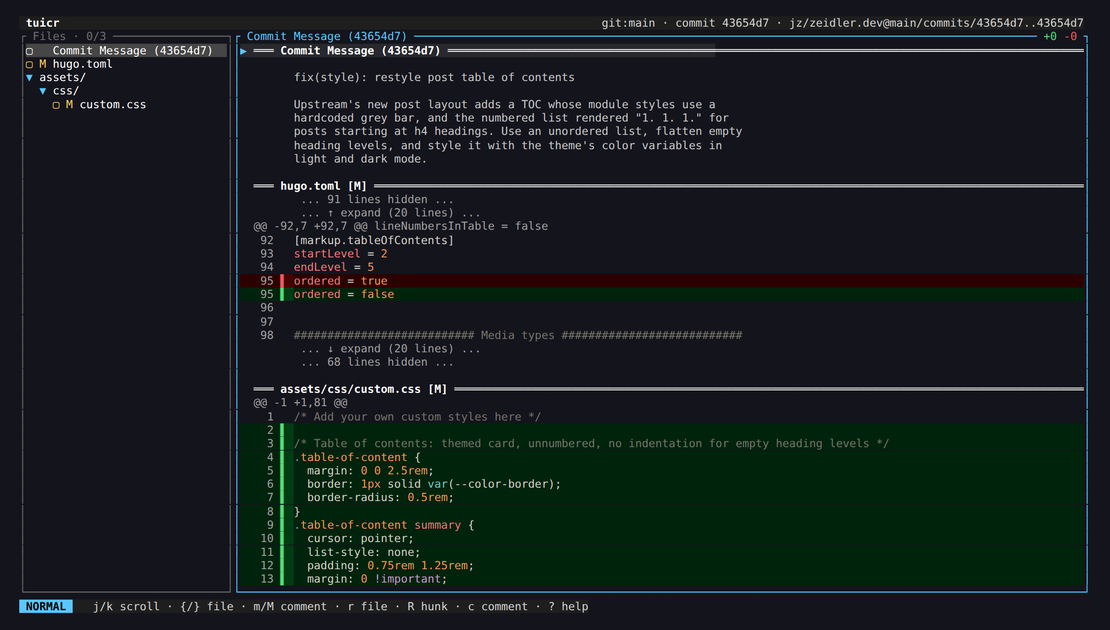
Code review in the terminal with tuicr
- Julius Zeidler
- Workflow , Ai
- October 13, 2026
Table of Contents
If you’ve read my post about tmux, you know I’m trying to keep my hands on the keyboard and my work in the terminal. I have a tmux session per project and one per ticket, with my shells and vim in there. Code review usually doesn’t fit in there. It means pushing a branch, opening a pull request and clicking through a web UI, one comment box at a time.
For a colleague’s work that’s fine, there has to be a pull request anyway. LLM generated code is different. I review it before I push it anywhere, to make sure it doesn’t break anything in my CI pipelines and that it follows my standards and does what I actually wanted. If I did that in the web, the code would already have run through a pipeline.
And that’s a security problem. A pipeline potentially has web access, credentials and access to internal systems, all things the LLM must not have access to. If an LLM can push code into a pipeline and read its output, it can exfiltrate data, exploit systems and gain privileges. So the review happens before the push, on my machine, and I decide what leaves it.
Enter tuicr
tuicr (pronounced “tweaker”, don’t ask me why) is a code review tool for the terminal. It shows a diff the way GitHub does, all changed files in one long stream, and you navigate it with vim keys. j and k, { and } to jump between files, [ and ] between hunks. Press c to comment on a line, v to select a range, r to mark a file as reviewed. If your fingers know vim motions, there’s not much to learn.
It doesn’t need a pull request at all. tuicr -w reviews whatever is in your working tree right now, tuicr -r main..HEAD takes a range of commits. It works with git, jj and even Mercurial. Your review is saved, so if you have to switch context in the middle of a big diff (I have to, a lot), you can come back later and continue where you left off.
Feeding it back to the agent
Reviewing is only half of it. The other half is getting your comments back to the LLM so it can make the changes. Every comment in tuicr has a type: issue, suggestion, note or praise. When you’re done, press y and tuicr copies the whole review to your clipboard, each comment numbered and pointing to a file and line, something like src/auth.rs:42 - Magic number should be a named constant. Paste that into the chat and every comment comes with file and line.
Feedback in a chat usually looks more like “the second function in that file is wrong”. Which file? Which second function? The agent has to guess, and when it guesses wrong, you need another round.
tuicr also ships with a skill for coding agents. The agent opens tuicr in a tmux split (Zellij, cmux and Herdr work too), you do your review, and afterwards the agent reads your comments with tuicr review comments. No copy and paste.
I tested the skill outside of my sandbox and it works nicely. But I run Claude inside a Docker sandbox, and there it has no access to my tmux session and can’t open a split. Dropping the sandbox to use the skill is not an option. Claude has to run isolated, that’s my security posture. So I yank with y and paste.
What I want to look into is running tmux and tuicr inside the sandbox, so the agent can open its review there.
Reviewing other people’s code
I also use tuicr to review other people’s code. At work that’s GitLab. tuicr mr 125 pulls the merge request, I review it the same way as everything else, and :submit sends my comments back as a real review, with the comments on the right lines. You need glab logged in to your GitLab instance for that. Besides GitLab, tuicr can submit to GitHub, Gitea, Bitbucket, Azure DevOps and Gerrit (tuicr pr 125 for those).
One last tip
tuicr --file opens any file for annotation, not just diffs. So the next time an agent hands you a plan or a draft for a blog post, you can review that the same way, line by line, with a file and line on every comment.